


Car Editor & Al Car Designer
4.147.00 Reviews
App Specs
- Version
- 1.1.5
- Updated On
- License
- Free
- Downloads
- 10,000+
- Developer
- Leading Software Development Studio
- Categories
- Auto & Vehicles
- Platform
- Android
Screenshots

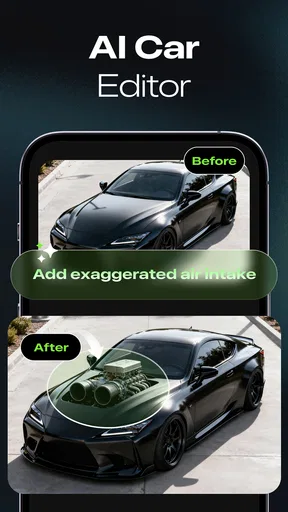
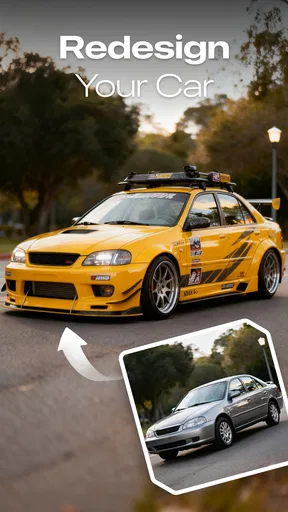
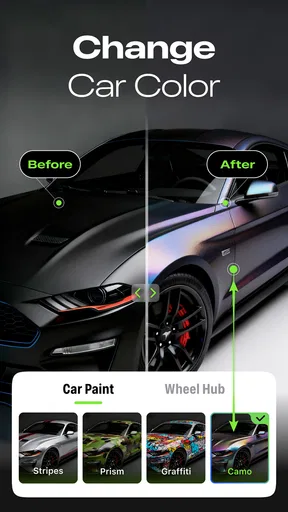
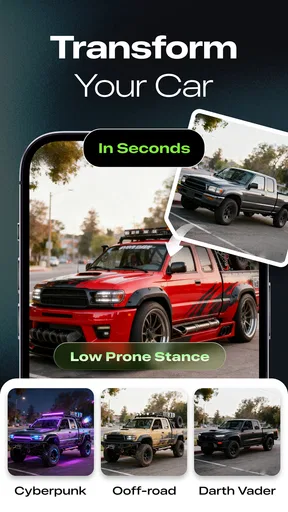
 Analysis by AppCompare
I like the idea of a car-design app that turns a quick photo or a passing idea into a visual experiment. Car Editor & Al Car Designer is aimed at that kind of curiosity: it gives you a way to explore looks ranging from sporty to futuristic without needing professional design software. I’d treat it as a creative tool for imagining possibilities, rather than a technical system for planning a real vehicle build.
A shared phone can turn car styling into a group activity
In a household, the most natural way to use a car editor is informally: one person starts with an idea, then passes the phone around while everyone suggests a different direction. A teenager might prefer an exaggerated futuristic look, while a parent might try a restrained color change or a sportier profile. That contrast is part of the fun, and it makes the app useful even when nobody is trying to produce a polished design.
A practical tip is to agree on one change at a time. If several people take turns changing the concept all at once, it becomes hard to tell which choice improved the result. I’d save or share a version before handing over the device, then let the next person make a distinct variation. That simple routine makes comparisons easier and avoids the familiar “I liked it better before” argument.
Keep expectations and account boundaries simple
For shared-device use, I’d think of the app as a single creative session rather than assume each household member has a separate workspace. Before someone else starts experimenting, check what is currently open and decide whether the existing design should be kept, shared, or replaced. This is especially useful if the phone or tablet is also used for schoolwork, work, or personal photos.
Design apps are also easier to enjoy when the group agrees on what “finished” means. One person may be happy with a bold color concept; another may want to adjust details for much longer. Setting a casual time limit or choosing a prompt—such as “make it look like a rally car” or “try a clean electric-car style”—keeps a shared session lively without turning it into a competition over who gets the device.
Age, trust, and sensible supervision
The app is rated for everyone, so its subject is broadly approachable for a household with different ages. Still, an age label is not a substitute for the usual shared-device judgement. I’d show a younger user how to move between the design activity and any sharing choices, and I’d review the result together before anything is posted or sent elsewhere. That is a sensible habit for any creative app, not a claim about special family controls.
There is also a useful distinction between playful styling and real automotive advice. A generated visual can help someone imagine a custom look, but it should not be treated as guidance about whether a modification is safe, legal, affordable, or compatible with a particular car. If a design sparks a real purchase or modification idea, I’d check with a qualified mechanic or specialist and confirm local requirements separately.
Worth Reading Before You Choose

Baby Panda World Brings Quick Play to Modern Phones, but Its Game Library Feels Busy

ESPN’s Live Game View Makes Following Close Games Easier

QuizzLand Review: A Good Fit for Short Trivia Breaks, Not Every Player

Basketball Stars: Multiplayer Is Fast, but Can It Recover When Matches Go Wrong?

WEBTOON Turns Phone Updates Into a Better Reading Routine

Link to Windows Runs on Shared Habits, Not Social Feeds
Getting Started with Your Dream Car
First things first, the installation process is a breeze. Once you fire up Car Editor & Al Car Designer, you’re greeted with a clean and intuitive interface. It’s super user-friendly, which means you won’t have to fumble around trying to figure out what does what. The app’s design ensures that even if you’re not a tech wizard, you’ll feel right at home.
Features That Fuel Your Imagination
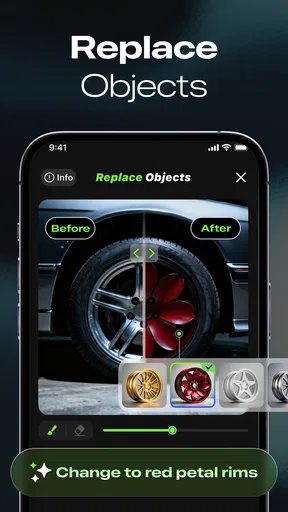
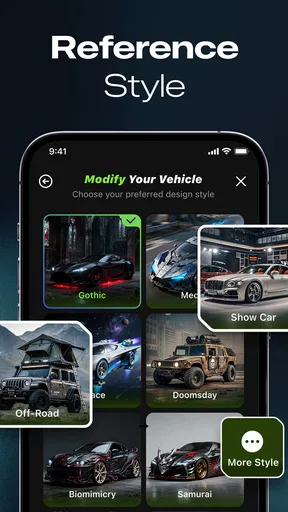
The app boasts a plethora of features that let you get creative with your car designs. You’ve got everything from body customization to paint options, and even a selection of rims that would make any car lover swoon. Honestly, the sheer volume of customization options is impressive.
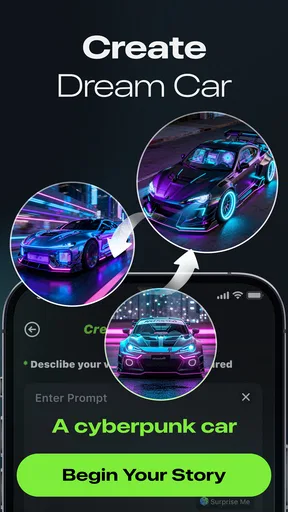
What’s really cool is how the app uses AI (Artificial Intelligence) to assist you in the design process. Imagine having a smart assistant guiding you on the best color combinations or suggesting design tweaks to enhance your car’s aesthetics. It's like having a designer buddy in your pocket!
For people who will share the phone, I’d start with a simple prompt and compare a few broad concepts before getting absorbed in tiny adjustments. A striking color or a different overall style is easier to discuss than a string of subtle edits, and it gives each person a clear starting point. Once the group agrees on a direction, the finer choices become more purposeful.
Design Like a Pro
For those who love detail, the app doesn’t disappoint. You can zoom in and fine-tune every little aspect of your car. Whether it’s adjusting the curve of the hood or tweaking the angle of the spoiler, you’ll have a blast perfecting your masterpiece.
The 3D rendering capabilities are top-notch, providing a realistic view of your creation. You can rotate, zoom, and view your car from different angles, which is super helpful to ensure every detail is just right. It almost feels like you’re crafting your dream car in a virtual garage.
That close-up control is best used after the overall concept feels settled. I’d inspect the car from farther away first, then zoom in on details that still look out of place. A spoiler or wheel choice that seems appealing close up may not suit the complete silhouette, so stepping back between edits is a useful way to avoid overworking one area.
Choosing the right tool for the job
Compared with a general photo editor, this app is more focused on automotive styling: the point is to explore a car concept, not to retouch portraits, build a collage, or make broad graphic layouts. That focus is a plus when the question is “what might this car look like with a different design?” A conventional image editor is the better choice when precise manual masking, typography, or work across many kinds of images matters more than vehicle-themed creativity.
It also sits between casual visual inspiration and specialist design software. Someone who wants to play with a look or gather ideas may find a dedicated professional tool unnecessarily involved. On the other hand, a mechanic, automotive designer, or buyer who needs accurate dimensions, parts compatibility, or a dependable preview of a real modification should use tools built for those tasks. I wouldn’t use an AI-styled image as a promise that a real-world change will fit or look exactly the same.
Saving, sharing, and keeping a useful record
Once you’ve completed your dream car, the app lets you show it off to the world. You can easily save your designs and share them with friends on social media. It’s a great way to get feedback or just flaunt your creativity.
Plus, there’s a community aspect where you can explore other users’ creations. It’s inspiring to see what others have come up with and might spark new ideas for your next project.
If you are comparing several ideas, give each saved version a clear description when you share it—for example, noting whether it is the color experiment or the more futuristic take. That makes feedback more useful than simply asking which picture looks best. I’d also think before sharing anything that includes a recognizable personal vehicle or background details; a design can be fun to show while still deserving the same privacy care as any image.
People often wonder whether they need design experience to get something enjoyable from an app like this. I don’t think they do: a clear visual idea is enough to start, and the editing process can be part of discovering what works. The more relevant question is whether you want imaginative styling or exact technical control. For the former, this is the more approachable kind of tool; for the latter, its creative focus is a limitation rather than a shortcut.
Who will get the most from it
Whether you’re a seasoned car designer or just starting out, this app is a fantastic tool. It’s perfect for anyone who loves cars and enjoys getting creative with design. I found myself spending hours lost in the endless possibilities, tweaking and perfecting my car until it was just right.
It should suit people who enjoy visual experiments, car fans looking for inspiration, and families who want an easy shared activity. It is less suitable for anyone expecting a technical configurator, a faithful preview of a specific aftermarket part, or a full image-editing suite. If you mainly want to compare manufacturer-approved trims or check whether a modification works on your exact model, a model-specific configurator or specialist advice is a more dependable route.
There are a few practical trade-offs to keep in mind. AI-assisted design can make exploration feel quick, but the output is still a creative interpretation, so a person seeking exact control may find it less predictable than manually editing every element. Likewise, a wide range of choices is enjoyable when you have a direction, but can feel aimless if you open the app with no prompt at all. I’d begin with a single question—such as whether the car should feel elegant, aggressive, or futuristic—then judge the result against that intention.
The app comes from Leading Software Development Studio and is free to install, with in-app purchases listed from $4.99 to $39.99 per item. Its average rating is 4.1 from around a thousand ratings, and it has over ten thousand installs. It was released on September 2, 2025; version 1.1.5 requires Android 7.0 or later. Those details make it easy to judge the basic commitment: trying it does not require an upfront purchase, but some items may involve spending, so I’d check the purchase details before confirming anything on a shared device.
Why You’ll Love It
The blend of creativity, technology, and community makes Car Editor & Al Car Designer a must-have for any car lover. It’s like having a mini design studio in your pocket, ready whenever inspiration strikes.
My household verdict is that it works best as a low-pressure idea generator: pass the device around, agree on a theme, save a few contrasting concepts, and let everyone explain their choices. It is not a substitute for automotive expertise or a promise of real-world fit, but it can make styling ideas more tangible and give car enthusiasts something enjoyable to discuss together.
So, if you’re ready to unleash your inner designer and have some fun along the way, give this app a spin. Trust me, it’s an exhilarating ride!
Pros
- Extensive car customization options.
- User-friendly interface for beginners.
- High-quality 3D graphics and textures.
- Regular updates with new features.
- Offline mode available for designing.
Cons
- Limited color palette in free version.
- Occasional crashes on older devices.
- Some features require in-app purchases.
- No social sharing for designs.
- Ads can be frequent and intrusive.
FAQs for Car Editor & Al Car Designer
What features does Car Editor & Al Car Designer offer?
Car Editor & Al Car Designer provides a comprehensive suite of tools for customizing vehicle designs. Users can modify paint colors, add decals, change wheels, and tweak body parts. The app also includes a 3D rendering feature that allows you to view your car from different angles, making it easy to visualize your design.
Is Car Editor & Al Car Designer suitable for beginners?
Yes, the app is designed with user-friendliness in mind, offering an intuitive interface that is suitable for both beginners and advanced users. It includes tutorials and a help section to guide new users through the design process, making it accessible for anyone interested in car customization.
Does the app require an internet connection to use?
Car Editor & Al Car Designer can be used offline for most of its features, which is great for users who want to design on the go without relying on a stable internet connection. However, some features, like online sharing and community design galleries, do require internet access.
What devices support Car Editor & Al Car Designer?
The app is available for both Android and iOS devices. It supports a wide range of smartphones and tablets, ensuring compatibility with older and newer models. However, for optimal performance, it's recommended to use devices with updated operating systems and sufficient processing power.
Are there any in-app purchases or subscriptions?
While Car Editor & Al Car Designer is free to download, it offers in-app purchases for additional features and design packs. There are also subscription options for users who want access to premium tools and exclusive content. The app provides a detailed breakdown of these costs within the store section.


